 blog
Dallas Home Security: What Actually Protects Your House
Last Updated: November 21, 2026
Quick Summary
Dallas home security is not a product you buy but a set of layers that work together: deterrence, detection, and recording. Map your entry points first, then decide which layer each one needs, and test the system before the installer leaves.
- Cover the approach, not the door, so cameras frame faces at the walkway.
- Wired cameras win on reliability; wireless suits rentals and single-camera additions.
- Confirm cellular and battery backup so alerts keep flowing during an outage.
- Get contract length, equipment ownership, and cancellation terms in writing before signing.
- Schedule a walkthrough before buying equipment to avoid covering the same driveway three times.
Table of Contents
- What Dallas Home Security Really Requires
- Dallas Home Security Cameras: Placement and Wiring Decide the Outcome
- What Home Security System Installation Involves
- Smart Home Security Integration That People Actually Use
- How to Read Dallas Home Security Reviews Without Getting Fooled
- Power, Connectivity, and Backup Protection
- Schedule a Walkthrough Before You Buy Anything
- Frequently Asked Questions
What Dallas Home Security Really Requires
Dallas home security is not a product you buy. It is a set of layers that either work together or fail separately. At All Around Technologies LLC, we install cameras, networking, and smart home systems across Royse City, Rockwall, Fate, Greenville, and the surrounding DFW communities.
It doesn't.
A camera without a recorder is a live feed you'll never check. A recorder without backup power is a brick when the grid drops. An alarm without a plan for who responds is a loud noise.
The Three Layers Most Homes Are Missing
Think of home protection as three separate jobs.
Many homes have detection and little else, such as a doorbell camera without continuous recording, backup power, or side-gate coverage. A setup like that is closer to a notification service than a complete security system.
The fix is unglamorous: map your entry points first, then decide which layer each one needs. A back gate needs detection and recording. A front door needs all three. A second-story window needs detection only.
Dallas Home Security Cameras: Placement and Wiring Decide the Outcome
Home security cameras depend on two decisions made before anyone drills a hole: where the lens points and how the cable gets there.
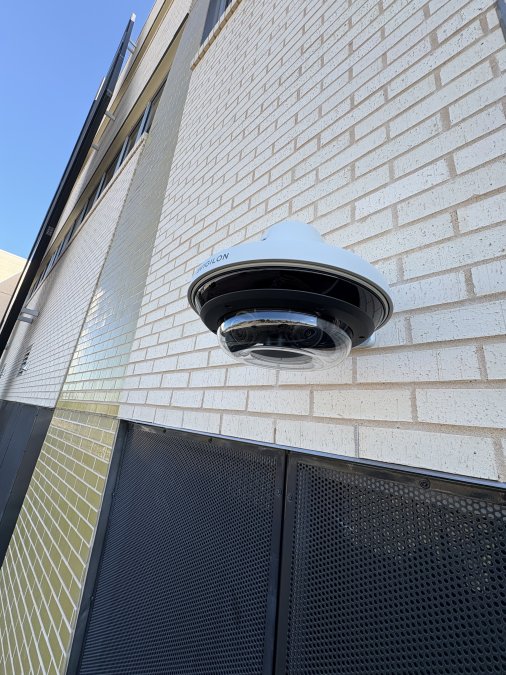
Placement first. Cover the approach, not the door. A camera that frames faces at the walkway is worth more than one staring at the doormat. Watch for backlight from west-facing positions in the afternoon, and keep lenses out of reach of a ladder.
Wiring second. This is where most installs go wrong.
Wired vs. Wireless Camera Systems
| Factor | Wired System | Wireless System |
|---|---|---|
| Reliability | Constant connection, no battery swaps | Depends on Wi-Fi strength and battery |
| Installation effort | Higher, requires cable runs | Lower, but placement is limited by signal |
| Power outages | Survives if on backup power | Often drops with the router |
| Best for | Whole-home coverage, long-term | Rentals, single-camera additions |
| Ongoing cost | None for power or batteries | Battery replacement over time |
Wired cameras win on reliability, full stop. Wireless wins when running cable isn't practical. A common mistake is mounting a wireless camera at the far corner of a garage where the Wi-Fi signal is already weak; the camera records gaps instead of events.
If you want the wiring hidden rather than stapled along a baseboard, that's a cable-routing job, and it's the same skill set as hidden-wire TV installation and network cabling. Low-voltage cable like Ethernet and camera power is not the same as line-voltage electrical wiring. If a run needs a new outlet or crosses into your home's electrical system, bring in a licensed electrician.
What Home Security System Installation Involves
Home security system installation is the work of turning separate devices into one system that reports to one place. That means mounting, cabling, configuring the recorder, setting motion zones, connecting the mobile app, and testing every sensor before the installer leaves. The steps are similar from company to company. What separates a good install from a bad one is how those steps are adapted to your specific house and how the system behaves when something fails.
Here is a typical sequence for a professional security system installation, and what each step covers:
- Walkthrough and coverage map. Identify every entry point, blind spot, and cable path. Property-specific factors such as alley-facing garages, detached structures, shared driveways, and mature trees that create shadows that motion detection may read as movement are worth noting at this stage.
- Mounting and cable routing. Cameras, sensors, and the recorder, with cable concealed where practical. Low-voltage cable such as Ethernet and camera power is not the same as line-voltage electrical wiring; if a run needs a new outlet or crosses into your home's electrical system, a licensed electrician should handle that portion.
- Network configuration. Cameras on a stable connection, ideally on a separate network segment from guest and streaming traffic so one heavy device doesn't degrade the rest.
- Recorder and storage setup. Retention settings, motion zones, and alert thresholds. Decide up front how long footage is kept and who can view it.
- App and remote access. Tested on your phone, not just the installer's, including what happens when you're away from home.
- Full system test. Every sensor triggered, every camera checked, every alert confirmed, then a deliberate power and internet interruption to see how the system behaves.
Matching the Install to the Property
A system that works well in new construction can underperform in an older home, and vice versa. A few patterns we plan around:
- Older homes with plaster or masonry walls often need different mounting hardware and cable routes than drywall, and Wi-Fi may not penetrate as expected.
- Homes with detached garages or workshops usually need a separate connectivity plan, not just another camera on the main network.
- Rental properties may limit drilling and cable runs, which changes the wired-versus-wireless decision.
- Larger lots with side gates and rear alleys need coverage mapped to the approach, not just the doors.
The Response Plan Matters as Much as the Equipment
An alarm without a plan for who responds is a loud noise.
Testing the final installation is important. If you want a clearer picture of what professional work covers before you commit, our breakdown of what camera system installation costs really cover walks through the scope.
Smart Home Security Integration That People Actually Use
Smart home security integration is the practice of connecting cameras, sensors, locks, and lighting so they respond to each other instead of sitting in separate apps. The goal isn't a clever demo. It's fewer decisions at 2 a.m.
A practical setup looks like this: a door sensor triggers a hallway light and starts recording; a camera detects a person at the side gate after dark and sends one alert, not forty; a smart lock lets a contractor in without a key.
A common mistake is buying devices from several brands and expecting them to talk. Some do. Many don't, or only halfway. Before you buy anything, confirm three things:
- Does the device work with the hub or app you already use?
- Does it keep working when the internet is down?
- Can you control it locally, or does everything route through the cloud?
If you want the step-by-step version, our guide on how to integrate smart home devices covers pairing order and the settings that prevent false alerts.
How to Read Dallas Home Security Reviews Without Getting Fooled
Reviews are useful only if you know what to ignore. Star averages tell you almost nothing. Read for specifics instead, and then go past the reviews to the terms that actually determine whether you'll be happy two years in.
A review that says "great job, very professional" is noise. A review that says "they ran cable through the attic instead of surface-mounting it and cleaned up after" tells you something about how the company works. Look for:
- Details about the work, not just the outcome
- Complaints about follow-through, which matter more than complaints about price
- Consistency across years, not a cluster of reviews from one month
- Whether the reviewer describes the same service you're buying
The Terms Reviews Rarely Mention
Most reviews describe the sales experience or the install day. Few describe the parts of the agreement that shape the next several years. Before you sign anything, get clear answers on these in writing:
- Contract length and renewal. How long is the initial term, does it auto-renew, and what notice is required to stop it?
- Equipment ownership. Do you own the equipment outright, or is it tied to the service agreement? What happens to it if you cancel?
- Monitoring plan details. What is included, what costs extra, and can the plan be changed without extending the contract?
- Cancellation terms. Are there early-termination charges, and under what conditions?
- Financing. If financing is offered, what are the terms, and is the debt tied to the equipment or the service?
A common pattern is a low advertised starting figure that assumes a long contract and financed equipment. The full cost is the sum of equipment, installation, activation, monitoring, and any cancellation exposure, not the headline number. Ask for that total in writing.
An Honest Limitation
Reviews can't tell you whether a company is right for your house. A crew that's excellent on new construction may be less experienced with a 1960s home and its particular wall construction. Ask directly, and ask what they do when a sensor fails after the warranty period.
Vetting contractors is its own skill. Our guide on how to hire reliable home technology contractors covers the questions worth asking before anyone shows up.
Power, Connectivity, and Backup Protection
Power and connectivity are two failure points that are easy to overlook, and they matter a great deal. A security system that goes dark during a storm is doing nothing while it's dark.
Start with power. A battery backup on your recorder and router keeps recording and remote access alive through short outages.
Then connectivity. Cameras and smart devices compete for bandwidth with streaming, work calls, and everything else.
Watch out: a system installed with no backup power and no plan for an internet outage will fail exactly when you need it. Test the unplugged scenario before you trust it.
Schedule a Walkthrough Before You Buy Anything
Buying equipment before anyone has looked at your house is how people end up with three cameras pointed at the same driveway and nothing covering the side gate. A walkthrough costs you an hour and prevents that.
Seeing the property first helps show where the cable can run, where the signal is weak, and which doors need coverage, so the recommendation is based on your house.
If you're ready to talk it through, contact us to schedule a walkthrough and ask questions before you spend anything.
Most homes in this area don't need more devices. They need the right ones, placed correctly, wired to survive a storm, and tested before the installer's truck leaves the driveway.
Frequently Asked Questions
How much should home security cost?
Costs break into three parts: equipment, installation, and any monthly monitoring or subscription fees. Equipment and installation pricing depends on how many cameras, sensors, and entry points you cover, and monitoring fees vary by provider and contract length. Ask every provider for a written breakdown of all three before you sign. A cheap quote that hides a long monitoring contract is not actually cheap, and a free-installation offer usually means the cost moved into the monthly rate.
Do home security systems require professional installation?
Plug-and-play wireless kits can be self-installed, but the results depend heavily on placement and network strength. Cameras mounted too high lose facial detail, and Wi-Fi cameras on a weak signal drop recordings. Professional home security system installation matters most when you want wired cameras, in-wall cabling, or cameras and sensors tied into one app. If you are not comfortable running low-voltage cable or configuring network settings, a local installer saves you a return visit.
Can home security cameras work with a smart home system?
Yes, and smart home security integration is where most of the practical value sits. Cameras, door sensors, and smart locks can trigger routines, like turning on lights when a door opens after dark or sending a clip to your phone. The catch is brand compatibility: not every camera talks to every hub. Pick your platform first, then choose cameras that officially support it, or have an installer confirm compatibility before you buy.
Are security cameras enough to protect a home?
Cameras document what happened; they rarely stop it. A layered setup adds door and window sensors, motion detection, and either professional monitoring or immediate phone alerts. For a Dallas-area home, that combination covers the gaps cameras miss, like a side gate or garage entry that is never on camera. Cameras are the most useful single layer, but they work best alongside sensors and a clear alert plan for when you are away.